Time counting
By default the time taken by Actions is computed and shown in the application Message area. For example:
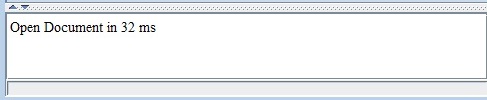
Note that the counting of time is by default computed between:
Note that the counting of time is by default computed between:
- The start of the MDIAction.run() method
- The end of the MDIAction.run() method
More control on the time counting
In some cases (for example if you open a file chooser in therun() method) you may want to have more control on the way the time is counted. You can do that by using the following methods:- MDIApplication.stopTime(MDIAction action): Return the time since the last start, and stop showing the progress bar
- MDIApplication.startTime(MDIAction action): Start the time counting, and Show the progress bar
- MDIApplication.noWriteMessages(): Don't print a message in the message Area for the current MDIAction. If can be useful for example if you abort an action in the
run()method, such as cancelling a file chooser
   public void run() throws Exception {
      app.stopTime(this); // don't show the progress bar
      JFileChooser chooser = new JFileChooser("Open Image");
      chooser.setDialogTitle("Open Image");
      chooser.setFileSelectionMode(JFileChooser.FILES_ONLY);
      if (chooser.showOpenDialog(app.getApplicationWindow()) == JFileChooser.APPROVE_OPTION) {
        app.startTime(this); // show the progress bar and start to count
        File file = chooser.getSelectedFile();
        BufferedImage image = ImageIO.read(file);
        if (image == null) throw new Exception("Bad File type");
        JScrollPane pane = new JScrollPane(new ImagePanel(image));
        app.addTab(pane, image, file.getName());
     } else {
        app.noWriteMessages(); // will not write anything in the message area (in this case the file chooser has been cancelled)
     }
   }
Don't sdhow the time at all
If you don't want to show the time for actions at all, you can override the MDIApplication.writeTimeMessages() method. For example:@Override public boolean writeTimeMessages() { return false; }
See also
- Actions: This article is about the handling of actions
Categories: General | Swing
